

Last Updated: July 8, 2026

Everything about Guru Hosting

Table of Contents
    Add a header to begin generating the table of contents
    SM90Darren Wilson

    Co-authored by

    Fact Checked

    100% human content The content of this article was entirely researched, written and reviewed by humans, to ensure accurate and exclusive information. No AI writing tools were used.

    I’ve been building and managing websites for a long time now, and if there is one thing I absolutely dread, it is moving to a new web host. It’s always a massive headache. You have to move files, export databases, update name servers, and then pray that your site doesn’t break or go offline during the transition. Because it’s such a pain, most of us just stick with whatever host we signed up with years ago, even if our pages load slowly and the customer support team takes days to reply to a simple ticket.

    But eventually, you reach a breaking point. When your site starts throwing database connection errors during a tiny rush of traffic, or when your visitors start complaining about pages loading in slow motion, you know it’s time to pack up and move.

    If you search online for recommendations, you’ll just get hit with a wall of lists recommending the same three or four massive corporate hosts. They’re popular because they spend millions on advertising, not because they’re actually good. Most of them offer dirt-cheap introductory rates, but once they get your credit card on file, the performance drops, the upsells start, and you’re stuck talking to automated chatbots whenever something goes wrong.

    Recently, I started hearing a lot of buzz about a smaller, independent UK host called Guru Hosting. They don’t have the massive marketing budgets of the big players, but people in developer groups kept talking about how fast their servers are and how their support team actually knows what they’re doing.

    I decided to test them out myself. I bought a plan, moved one of my live cryptocurrency blogs over to their servers, and ran a bunch of performance tests.

    In this review, I’m going to share the actual results of those tests, explain exactly what you get for your money, and show you some of the best alternative hosts on the market if Guru doesn’t fit your budget or your specific project.

    Why Guru Hosting?

    To see if a host is actually any good, you have to test it with a real, live website. I chose my site hedgeup.io—a blog that covers cryptocurrency news, guides, and updates. It’s a standard self-hosted WordPress blog packed with active plugins, custom scripts, and a database that isn’t exactly lightweight—which makes it a great way to push the servers and see if they lag.

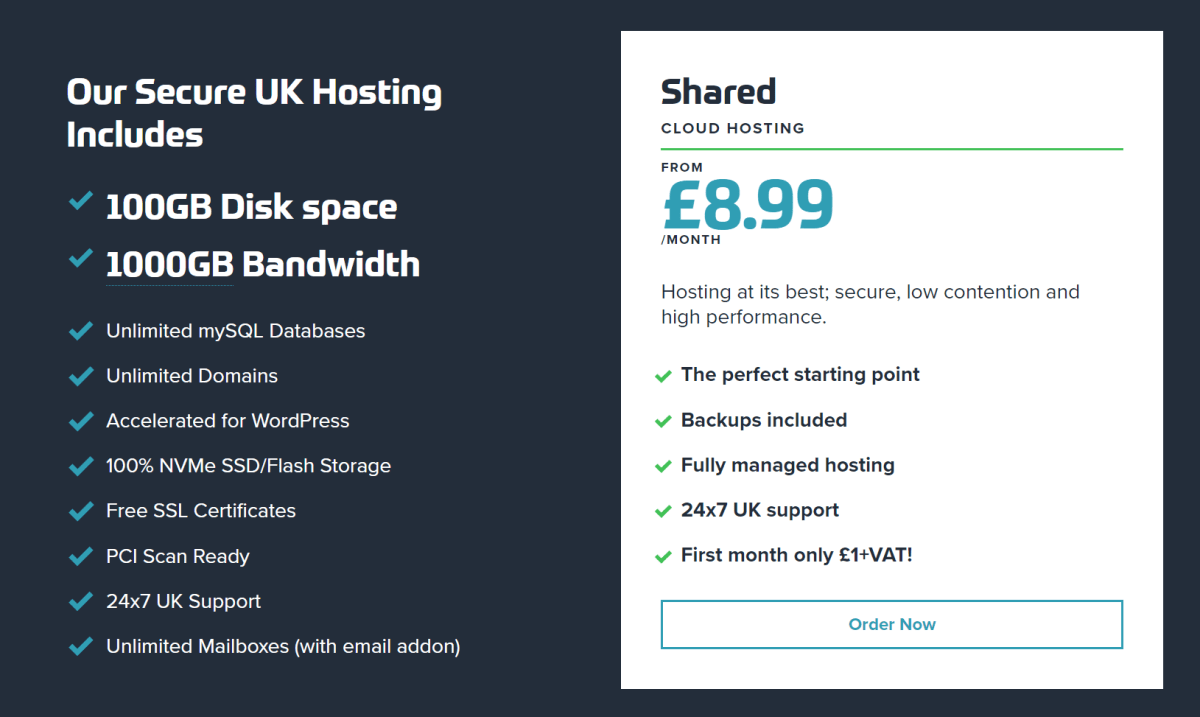
    I signed up for Guru Hosting’s Shared Cloud Hosting plan. The standard price is £8.00 per month, which is already pretty reasonable, but what really convinced me to try it was their first-month offer. They let you try the service for just £1 + VAT. It’s basically the price of a cheap cup of coffee, so I figured I had nothing to lose.

    When I was looking over their features, a few things stood out to me. First, they use NVMe storage. If you aren’t a server geek, NVMe stands for Non-Volatile Memory Express. It’s a newer type of storage that is much faster than the standard SSDs most hosts use, and it is lightyears ahead of old-fashioned mechanical hard drives. This means when a visitor clicks on your site, the server can fetch your database files and images almost instantly.

    Second, they run on LiteSpeed web servers instead of the traditional Apache setup. LiteSpeed has built-in caching at the server level. Instead of using heavy WordPress plugins to generate your pages on the fly every time a visitor arrives, the server keeps a pre-built copy of your pages ready to deliver.

    Performance and Reliability

    Third, they handled the whole migration process for me without charging a penny. I literally just handed over the login info for my old host, and their team had the database, files, and everything else moved over in a few hours. No downtime, no stress. They also set up a free staging site—essentially a duplicate of my site where I can play around with new plugins or update themes without messing up the live pages my visitors see. And unlike budget hosts that restrict you to a single website, Guru lets you add as many domains and email accounts as you want.


    The setup itself was a breeze. They use cPanel, which is the standard control panel most of us are used to anyway, so I didn’t have to spend hours learning a new system just to create a basic email account or check my files.

    Let’s Check My Own Experience with Guru Hosting

    Putting the Server Speed to the Test

    Once the DNS was pointed to the new servers, I wanted to see if the hardware actually delivered. I put hedgeup.io through a few speed tests to see how fast it loads for users in different countries.

    Google PageSpeed Insights

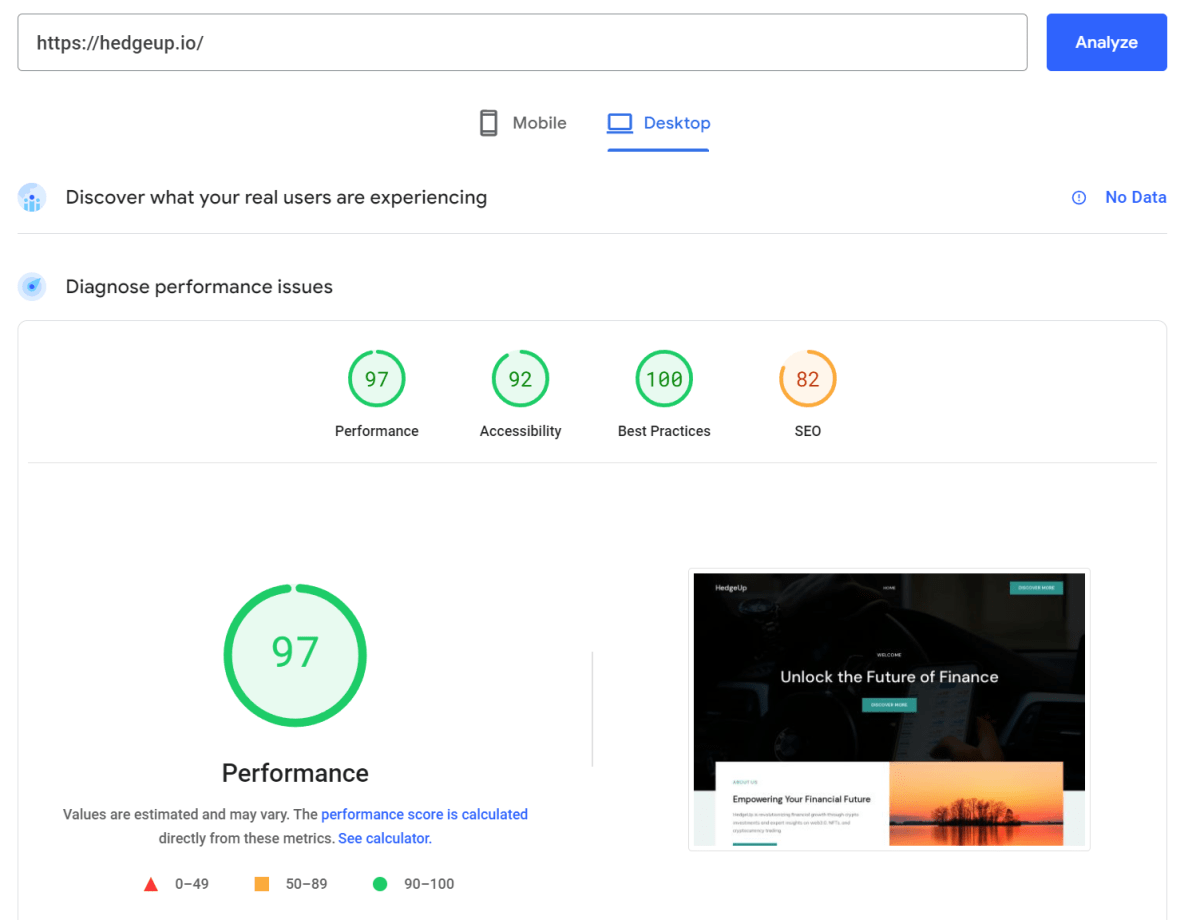
    First, I ran it through Google’s PageSpeed tool. Google hates slow sites (especially on mobile), and if your site lags, they’ll bury your rankings. I was hoping for a decent score, but my site actually scored a 97 out of 100. That’s a crazy good result for a live blog running active plugins and tracking scripts. It shows the LiteSpeed server-level caching is actually doing the heavy lifting.

    GTmetrix London (UK)

    Since Guru’s data centers are in the UK, I ran a test from a London server to see how it performs close to home.

    It hit a Grade A with a 99% performance score. The main content loaded in less than a second. If you’re building a site for readers in the UK or Europe, this is exactly the kind of speed you need.

    But what if your readers are based overseas? If someone clicks your link from the US or Canada, do they get stuck waiting? I ran the same test from Vancouver to see.

    Even across the Atlantic, the site still walked away with a Grade A and a 90% score. The server reacted quickly enough that international readers won’t notice any lag at all.

    Even the browser timing result clearly shows us how fast any website that is hosted on Guru Hosting can load and perform well anywhere in the world.

    DNS Propagation

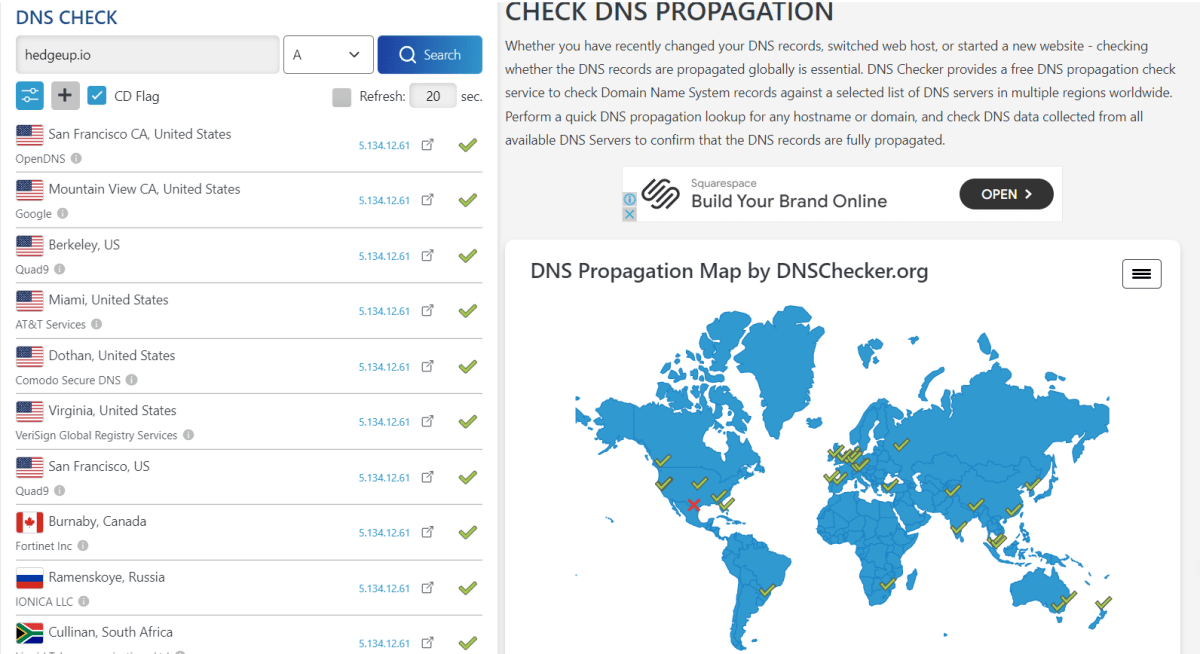
    When you point your domain to a new host, the change has to spread across the internet. With cheap hosts, your site can go offline for days. I tracked how fast Guru did this:

    The settings updated almost instantly across all the global nodes I checked. In a few minutes, the site was fully online worldwide—proving their network routing is solid.

    What’s Happening Under the Hood?

    Now that the speed tests are out of the way, let’s look at the actual tech keeping the servers running.

    One of the best things about Guru is that their security features are built into all plans, rather than being sold as expensive add-ons. They run every account in an isolated private environment. This means if another website on the shared server gets hacked, the infection is completely locked down and can’t spread to your files. Every plan includes free Let’s Encrypt SSL certificates, built-in protection against DDoS attacks, and a Web Application Firewall (WAF) that actively blocks malicious traffic and brute-force login attempts.

    They also protect your data with hourly offsite backups. Most budget hosts only back up your site once a day or once a week, and they store those backups on the same server. If the server crashes, you lose everything. Guru stores your backups on separate, offsite servers every single hour, so you can restore your site to exactly how it was an hour ago if you make a mistake or get hacked.

    For performance, they combine LiteSpeed servers with NVMe storage. When you sign up, you get access to the LiteSpeed Cache (LSCache) plugin for WordPress. The plugin takes care of optimizing images, cleaning up your database logs, and handling site-wide caching without you needing to do it manually. Now, Guru does have their own Content Delivery Network (Guru CDN), but to be honest, it’s a bit pricey and they don’t have many server locations. If you have readers clicking in from all over the globe, you’re much better off pairing their setup with a free Cloudflare account instead.

    If you care about sustainability, Guru is a registered green host. Their UK data center has run on 100% renewable energy for the last 15 years. They let you display a green hosting badge in your footer to show your visitors that you support eco-friendly operations.

    Finally, their customer support is outstanding. Many big hosts outsource their support to call centers or make you talk to an AI chatbot before you can reach a human. Guru provides 24/7 UK-based support via live chat, support tickets, email, and phone. Their support staff consists of actual system administrators who can jump into your server files and fix database errors or configuration issues quickly without giving you the runaround.

    Let’s Talk Hosting Plans

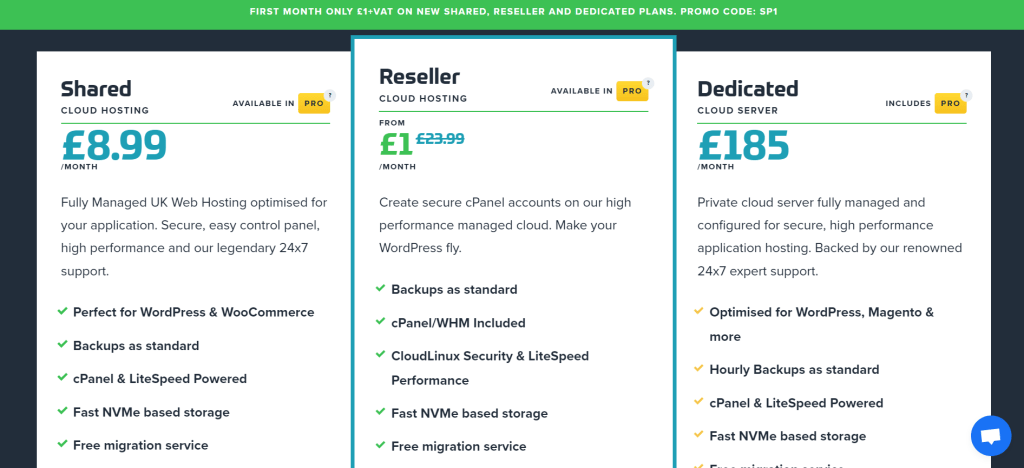
    Guru has a few different tiers depending on how big your site is and how much traffic you’re pulling in.

    Shared Hosting

    If you’re just starting out with a personal blog or a local business site, their shared plans are the best place to begin. The Shared Cloud tier (£8.00/mo) is their entry option, giving you LiteSpeed servers, a massive 100GB of NVMe storage, and the ability to host as many domains and email accounts as you want. If your traffic starts picking up, the Shared Boost plan (£19.99/mo) gives you semi-dedicated resources to handle traffic surges without breaking a sweat. And if your site is massive, the Shared PRO plan (£39.99/mo) acts like a VPS—giving you tons of memory and CPU power—without the headache of actually managing a virtual server.

    Reseller Hosting

    For web designers or agencies who manage client sites, their reseller plans let you buy server space in bulk and sell it directly to your clients. You can start with Reseller 10 (£29.99/mo) to manage up to 10 separate cPanel accounts, upgrade to Reseller 100 (£59.99/mo) for up to 100 client sites, or scale all the way up to Reseller 250 (£99.99/mo) if you’re running a larger portfolio.

    Dedicated Managed Hosting

    Finally, if you’re running a high-traffic e-commerce store or a large enterprise site, they have fully managed dedicated servers (Plans 1 through 5, starting at £149.00/mo). These come fully loaded with senior-level tech support, custom security settings, object caching, and support for any PHP version you need.

    Custom Reviews

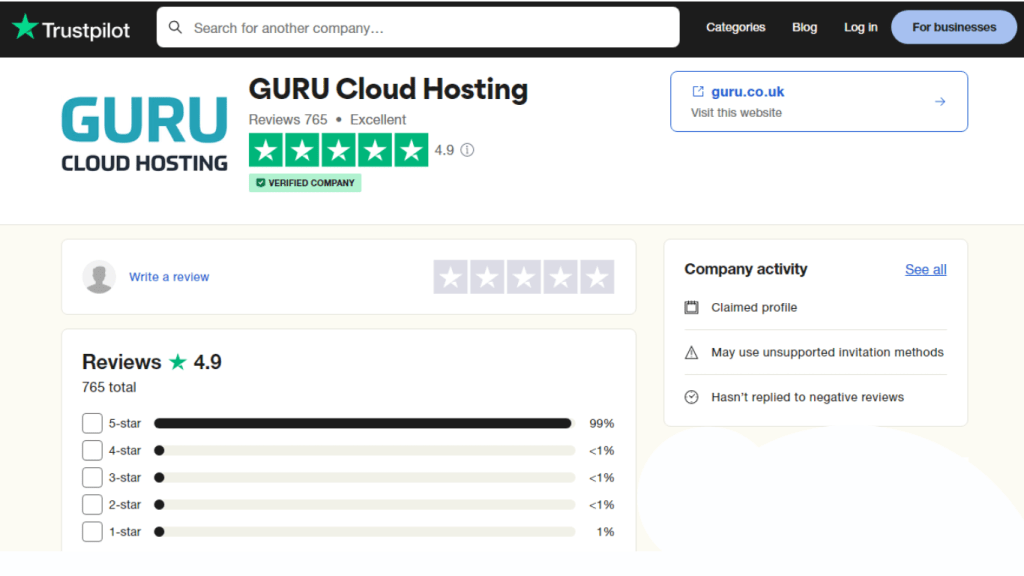
    Image illustrates the user review about Nichesss.

    Guru currently sits at a 4.8-star rating on Trustpilot. Reading through user feedback, most people praise the quick support times and how easy the migration process was. Since they’ve stayed independent instead of selling out to one of the massive hosting conglomerates, they’ve managed to keep their service quality consistently high.

    This means you can get help whenever you need it. They also offer migration services to make switching hassle-free.

    Alternatives of Guru Hosting

    If Guru isn’t what you’re looking for, or if the pricing doesn’t align with your project, here are a few other hosts I’ve spent time testing:

    1. Asura Hosting

    If you want to keep your hosting bill as close to zero as possible without buying a terrible service, Asura is a great alternative. Their plans cover everything from shared and reseller hosting to cloud setups, using fast SSD storage and servers spread across the US, Europe, and Asia. They’re well-known for solid uptime, making them a safe bet if you want to host a project without spending a lot. You can check out all our raw testing numbers in our full Asura Hosting review to see how their speeds hold up. They also throw in helpful extras like staging sandboxes for testing theme changes, developer tools like Git, and free help migrating your website.

    • Pricing: Shared hosting starts at 3.95/month, cloud hosting 4.95/month, and dedicated servers at $79.95/month.

    2. Bluehost

    You’ve probably heard of Bluehost—they’re massive, and WordPress.org officially recommends them. They are a solid choice if you’re a beginner because their setup wizard holds your hand through the whole WordPress installation and site launch process. They throw in a free domain for your first year, handle SSL certificates, keep WordPress updated, and include a drag-and-drop builder so you can put a layout together without coding.

    • Pricing: Shared hosting starts at 2.95/month, cloud hosting at 4.95/month, and VPS hosting at $18.99/month.

    3. Hostinger

    Hostinger is known for offering some of the lowest introductory prices in the hosting market, making it incredibly popular for students and hobbyists. Their custom control panel (hPanel) is clean, modern, and very easy to navigate. Despite the low prices, they still deliver solid loading speeds, and all plans include a free website builder, free email accounts, daily backups, automated site migrations, and 24/7 live chat support.

    • Pricing: Shared hosting starts at 2.99/month, VPS hosting at 3.99/month, and cloud hosting at $9.99/month.

    4. SiteGround

    This is a premium option built on Google Cloud infrastructure. It’s definitely pricier than budget hosts, but they make up for it with crazy fast speeds, custom caching (called SuperCacher), daily backups, and a solid customer support team. It’s a great choice if you’re running a business website or an online store where every millisecond of loading speed translates to revenue.

    • Pricing: Shared plans start around 6.99/mo,WordPress hosting at and cloud setups at $80/mo.

    5. DreamHost

    An independent host that’s been around forever, known for their massive 97-day money-back guarantee. They use a custom control panel rather than cPanel, but their plans are clean and they don’t do the aggressive price hikes on renewal that other hosts do.

    • Pricing: Shared hosting starts at 2.59/mo and VPS 15/mo.

    Importance of Good Hosting

    Having good hosting is really important for your website. It’s kind of like having a home for your website online. 

    When you have good hosting, it means your site is always there and loads quickly for people who visit. 

    But if your hosting isn’t good, your site might be slow or even stop working sometimes, which can make visitors upset. That’s why having a good website hosting provider is very important to keep your website running smoothly and to make sure your visitors are happy.

    How to Avoid Buying a Terrible Host

    Don’t just pick a host randomly. Keep these three things in mind before you enter your credit card info:

    • Be realistic about your traffic: If you’re building a basic personal blog, a cheap shared plan is plenty. But if you’re launching a store with dozens of products, database queries will slow down a cheap host instantly. Buy a plan that gives you dedicated RAM and CPU power.
    • Look at the core specs: Check if they use NVMe or SSD drives (avoid older HDDs), verify they have a 99.9% uptime guarantee, check how often they run backups, and make sure their support team is actually available when you need them.
    • Watch out for renewal traps: Almost every host advertises a tiny price (like $1.99/mo) and then quietly charges you four or five times that amount when the bill renews a year later. Check the renewal price before you sign up.

    FAQs

    Why is Guru Hosting different?

    They focus on speed by using LiteSpeed servers and NVMe storage on all plans, keep their support based in the UK, and run out of a green data center backed by 100% renewable energy.

    What freebies do they include?

    You get free site migrations, SSL certificates, hourly offsite backups, staging sandboxes, and unlimited email accounts.

    What is reseller hosting?

    It allows you to buy a block of hosting resources and partition it to host client sites or launch your own hosting brand under your own name.

    Which plan should I pick?

    Go with the Shared Cloud plan (£8.00/mo) if you’re launching a new site. You can always upgrade to Shared Boost later if your traffic grows.

    Is their support actually good?

    Yes. It’s 24/7 and UK-based, so you talk to real tech admins instead of getting stuck in chatbot loops.

    Conclusion

    If you are tired of web hosts that slow your site down and customer support teams that never actually help, Guru Hosting is an excellent choice.

    Their hardware is modern, their speed test results are excellent, and their customer support is far better than what you get from most big-name brands. Their £1 trial is a low-risk way to move a site over, run your own tests, and see how much faster your pages load when they are hosted on a well-optimized server.

    Scroll to Top